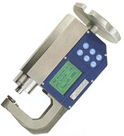
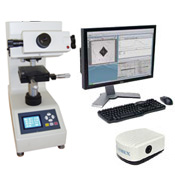
-10X Objective ( 100 Total Magnification)
-40X Objective ( 400 Total Magnification)
-Electronic eyepiece 10x with linear optical electronic
-Scale high definition division 0,1µ 0,5 HV for loads 10-1000gf.
-Piece-bearing X-Y table 25x25mm, div. 0.01mm.
-Diamond indenter Vickers or Knoop
-C-Mount camera port
-Micro Vickers or Knoop test blocks with traceable certificate
-Spare LED, & User manual
-Calibration certificate traceable to NIST
-Precision clamping vice capacity 25mm
-Digital stage micrometers
-1.3 mono digital camera with cable
-CMT software for automatic measurements (Clemex)
-Universal TV adapter "C" mount
-High Performance computer system with LCD
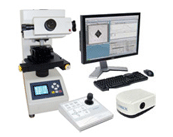
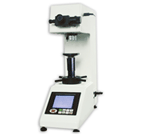
● MHT-S Series are
precision micro Vickers hardness testing machines integrated the
technology of optics, mechanics and compute, and it is focus on
the vickers testing under the small force, and mainly applicable
to measure t he hardness value of ferrous metals and non ferrous
metals.
● MHT-S Series
equipped with a LCD screen, the operation is more directly and
clearly.
● MHT-S Series can display the measuring
methods, testing force, indentation length, hardness value, dwell
time of the testing force as well as the number of measurement.
● MHT-S Series
can save and revise the date, record the measuring results,
compute the data, outputting the information with the printer.
● MHT-S Series
hardness conversion among 4 hardness scales, and linking to PC in
RS 232 interface and cable.
● MHT-S adopt the design of double indenters,
it equips with HV and HK indenter together, It is more suitable to
measure the hardness of IC thin sections, coatings , ply metals;
Glass, ceramics, agate , precious stones and other brittle and
hard material.
Standard Accessories included are:
- Manual X-Y stage
- Precision vice
- Standard test block (HMV700)
- Diamond indenter
- Measuring microscope electronic type
- TV CCD Auto Measure
- 10X Objective
- 40X Objective
- Level adjusting leg
- Light source led (12V 18W)
- Auxiliary tools
- Instruction manual
- Accessories box
- Digital stage micrometers
- 1.3 mono digital camera with cable
- CMT software for automatic measurements (Clemex)
- Universal TV adapter "C" mount
- High Performance computer system with LCD
Product Name
Single-Indenter Digital Micro Vickers Hardness Tester
Double-Indenter Digital Micro Vickers Hardness Tester
Model
MHT-S
MHT-D
Testing Force
gf
10、25、50、100、200、300、500、1000
N
0.098、0.246、0.49、0.98、1.96、2.94、4.90、9.80
Indenter
HV Indenter
HV and HK Indenter
Lens & Indenter Switch
Auto-Turret
Indentation Measurement
Digital Sensor Measurement
Loading Control
Automatic (Loading, Dwell, Unloading)
Magnification of Microscope
Observation:10x; Measurement:40x
Digital Eyepiece
Magnification:10x
Auto Hardness Conversion
HV、HRC、HB
Hardness Indication
LCD display
Dwell Time
Adjustable 1~99s
Testing Range
1HV~2967HV
X-Y Anvil
Size:100x100mm; Travel:25 x25mm; Resolution:2um
Illumination
Adjustable LED 6V, Cold light-source
Display
D1、D2 、HV/HRC/HB/HK、Time
Max. Height of Specimen
70mm
Instrument Throat
95mm
Power Supply
AC220V/50Hz;110V/60Hz
Execution Standard
GB/T4340.2, EN-ISO6507, ASTME10-18, ASTME-384
Clemex CMT Software (in HD
now) MOSAIC FUNCTION NOT AVAILABLE IN THE US
When a macro or micro hardness
testing solution that produces reliable, accurate and repeatable
test results is needed, choose from the Clemex CMT.HD line of
(single or dual) hardness testing solutions. Field proven systems,
they offer unparalleled capabilities and are fully ASTM E-384 and
DIN/ISO 6507 compliant.
Intelligent Workflow - 4 easy steps to run your test
Clemex CMT.HD is the
top-of-the-line automated microhardness tester. With 4 easy steps, it
provides added precision when positioning indents thanks to its integrated
image stitching technique and its layout tools. By visualizing the
complete sample, no matter its size, traverses and/or patterns can now be
mapped-out with unequaled precision. Auto focusing, and automatic
measuring and reporting, allow this system to function unattended, thus
increasing throughput and productivity
See the Entire Sample Place the sample in the sample-holder and, with one click, build a mosaic image of the sample and set reference points for one or more traverses using the annotation tools.
Set-Up Traverses/Patterns Open, modify, or create new traverses/patterns using reference points or lines. Traverses and patterns can be individually adjusted.
Click & Walk Away Clemex CMT.HD intelligently follows the predefined patterns, indents the sample, focuses when needed, measures, and generates data dynamically. Everything is automated, freeing users for other tasks.
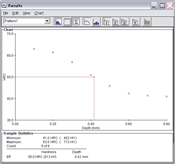
Get Results Review results in graphical and/or tabular format. Export results to the spreadsheet application of your choice, or simply print standard or customized reports.
Intelligent Layout Tools
Positioning reference points and measuring where traverses are to be placed is made easy using the annotation tools in Clemex CMT.HD. Conveniently located on the side of the Image Window, these tools perform multiple functions:
Finding the center of the sample
Drawing straight and/or parallel lines
Adding ticker marks
Adding measurements for report purposes
And more…
No matter the complexity of the pattern layout, combining intelligent mosaics with annotation tools allows traverses and/or patterns to be positioned precisely where they are needed.
Intelligent & Precise Positioning
Clemex Mosaic Feature Clemex CMT.HD is the first ever hardness tester to offer a complete, high definition image of a sample, no matter its size. This innovative feature provides an “aerial view” of the sample, offering sharp close-ups as well as global views. The Mosaic Image makes it possible to position as many as 99 traverses – to within a few micron
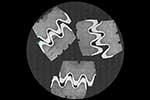
Traverse positioned in the middle of the branch and paralleled to the edge
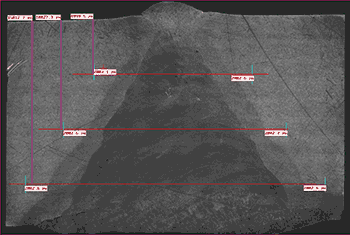
Traverse centered in weld sample
Five traverses perpendicular to edge of gear
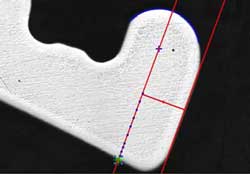
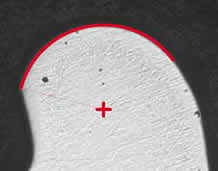
Unique Reference Circle Tool This exceptional tool allows indents to be positioned at precise distances from the sample’s edge. The Reference Circle is the ideal tool for irregular or curved samples, where indents need to be at a given distance from the edge. Used as a visual guide in conjunction with the Stage Pattern Window, once a radius is specified, the distance between indents is determined by a Y value that resets every time a field is added to the pattern.
Test Pattern placed on the edge
Multidirectional Traverses Thanks to the powerful Clemex Hardness Tester stage control interface, single or multiple traverses/patterns can be rapidly created. Save, copy, or paste traverses/patterns to predefined locations with a simple click of the mouse. The T-Bar tool rotates traverses to any angle to ensure its perpendicularity with the sample edge or to accommodate sample tilt. Up to 99 patterns or traverses can be created, with each traverse comprising up to 32,000 indents.
Rotation tool - T-Bar
3 Perpendicular traverses to the edge
More Options - these links will redirect to
Clemex.com